다음 그림과 같이 메세지박스를 만들려면..
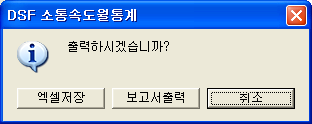
음.. 한 세가지 정도 방법이 나오네요
1. Win32API MessageBox를 사용하여...
다름 링크에 보시면 CBT HOOK을 이용하여 MessageBox의 Caption을 바꾸는 방법이 나와있습니다.
http://cbuilder.borlandforum.com/impboard/impboard.dll?action=read&db=bcb_tip&no=715
2. VCL의 MessageForm을 이용하여
; VCL에서 ShowMessage("메세지") 로 메세지를 띄우면
TMessageForm이라는 TForm을 상속받은 폼이 만들어지고
동적으로 TMessageForm위에 적당한 버튼과 Label을 만들어 Caption을 설정해서
ShowModal로 띄워줍니다.
위 내용을 직접 코딩하면 됩니다. 다음과 같이...
const  int mrExcelSave=mrYes;
const  int mrPrint=mrNo;

int __fastcall PrintConfirmMessageBox()
{
  TForm *frm =CreateMessageDialog("출력하시겠습니까?",mtInformation, TMsgDlgButtons()<Caption="DSF 소통속도월통계";
  for(int i=0;iControlCount;i++)
  {
    if(frm->Controls[i]->InheritsFrom(__classid(TButton)))
    {
        TButton *btn= (TButton *)frm->Controls[i];
        if(btn->Caption=="&Yes")btn->Caption="엑셀저장";
        else if(btn->Caption=="&No")btn->Caption="보고서출력";
        else if(btn->Caption=="Cancel")
        {
            btn->Caption="취소";
            btn->TabOrder=0;
        }
    }
  }
  int iRslt=frm->ShowModal();
  delete frm;
  return iRslt;
}
//----------------------------------------------------------------------------
void __fastcall TForm1::Button5Click(TObject *Sender)
{

  int iRslt=PrintConfirmMessageBox();
  if(iRslt==mrExcelSave)
  {
      ShowMessage("Excel로 저장합니다.");
  }
  else if(iRslt==mrPrint)
  {
    ShowMessage("Print합니다.");
  }
}
3. TForm으로 직접 디자인 하기
VCL의 메세지 박스가 모두 TForm을 상속받은 TMessageForm 이라고 얘기햇는데요
TMessageForm같은 메세지폼을 직접 Form하나 추가해서 만들고
그 Form을 ShowModal로 띄워서 ModalResult값을 받도록 하시면 됩니다.
이방법의 장점은
메세지 박스의 모양을 마음대로 디자인할수 있다는데 있습니다.
그럼..
우기 님이 쓰신 글 :
: 첨부파일처럼 메시지박스를 구성하고 싶은데 어케해야되는거죠..
|








