이게 답은 아니란걸 알지만 급하신것 같아서 답변은 달아보아요.
텝중에 Office2k 라는 텝이 있는데
그 중에 excel 관련된 모든 컴포넌트를 떨구고 컴파일 후에 다시 지우면
제대로 실행이 되네요.
컴포넌트를 떨굴 때 해더파일이 자동으로 추가가 되는데
라이브러리가 로드안되서 그런가..
제가 말한 방법이 아닌 해더부분만 추가하면 같은 애러가 나네요.
한번 해보세요~
갈라파고스인 님이 쓰신 글 :
: 안녕하세요,
:
: 엑셀 파일을 읽거나 쓰기 위해 선언해야 할 것이 뭐가 있을까요?
:
: 아래와 같은 코드를 인터넷 뒤져서 찾았는데요.. excel, Visible, Workbooks, Open, Sheets... 등등을 undefined symbol이라고 에러를 주네요....
:
: 참고로 win7에 엑셀은 2007입니다.
:
:
:
:
:
: void __fastcall TForm1::Button6Click(TObject *Sender)
: {
:
: //declaration of variables of type variant
:  Variant XL,v0,v1,vcell;
:
: //a string where you will temporarily put the content of a single Cell
:  AnsiString tmp;
:
: //create an object which is an excel application and store it to XL
:  XL=Variant::CreateObject(”excel.Application”);
:
: //Set the Excel Application as invisible once you have opened it
:  XL.OlePropertySet(”Visible”,false);
:
: //Get the workbooks while has a path stored in “file” variable and open it.
:  XL.OlePropertyGet(”Workbooks”).OleProcedure(”Open”,file);
:
: //Get the Sheet which has a title “Sheet1″
:  v0=XL.OlePropertyGet(”Sheets”,”Sheet1″);
:
: //Get the Cells of that particular Sheet.
:  v1=v0.OlePropertyGet(”Cells”);
:
: //Get the content of the Cell located at row 2 and column 3
:  vcell=v1.OlePropertyGet(”Item”,2,3);
:
: //store that content to ansistring “tmp”
:  tmp=vcell.OlePropertyGet(”Value”);
:
: XL.OleProcedure(”Quit”);
:  XL=Unassigned;
: }
:
:
: 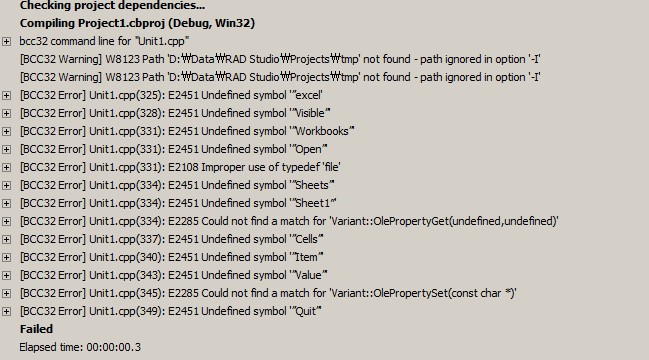 </a></td>
|








