Property에 DefaultDrawing 을 false로 변경하시면 그런문제가 없어집니다.
그럼..
송신영 님이 쓰신 글 :
: 안녕하세요. 오래간만에 질문 하나 드립니다.
: 2010에서 String Gride를 gdsGradient 이나, gdsThemed 로 사용중에
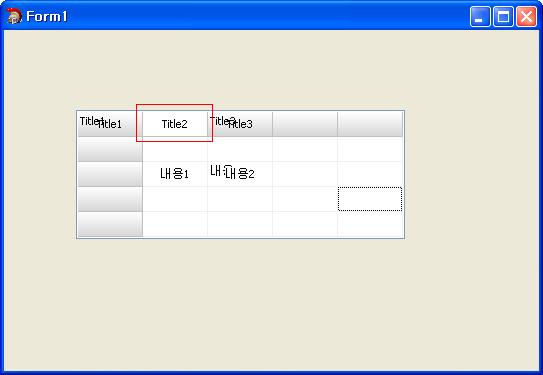
: Fixed Cell의 문자를 정렬하려면 그림과같이 Title1, Title3 같이 글자가 겹쳐서 그려집니다.
: 그래서 배경을 지우고 그리면 원래의 Gradient나 Theme가 사라집니다. (Title2 같이..)
: 그냥 내용 Cell의 경우 배경을 지우는 것은 문제될게 없는데
: Fixed Cell은 참 보기가 그렇군요...
: 원래의 배경을 그대로 두고 글자만 다시 정렬하는 방법이 없을 까요?
: 감사합니다.
:
: 
:
:
:
: //---------------------------------------------------------------------------
: void __fastcall TForm1::StringGrid1DrawCell(TObject *Sender, int ACol, int ARow, TRect &Rect,
: 		  TGridDrawState State)
: {
: //	unsigned OldAlign = SetTextAlign(StringGrid1->Canvas->Handle, TA_CENTER);
: //	StringGrid1->Canvas->TextRect(Rect, (Rect.Right+Rect.left)/2, Rect.Top+2, StringGrid1->Cells[ACol][ARow]);
: //	SetTextAlign(StringGrid1->Canvas->Handle, OldAlign);
:
: 	if(ACol == 1) {
: 		StringGrid1->Canvas->Brush->Color = clWhite;
: 		StringGrid1->Canvas->FillRect(Rect);
: 	}
:
: 	DrawText(StringGrid1->Canvas->Handle,
: 	AnsiString(StringGrid1->Cells[ACol][ARow]).c_str() ,-1,&Rect,DT_SINGLELINE|DT_VCENTER|DT_CENTER);
: }
: //---------------------------------------------------------------------------
: void __fastcall TForm1::FormShow(TObject *Sender)
: {
: 	StringGrid1->Cells[0][0] = "Title1";
: 	StringGrid1->Cells[1][0] = "Title2";
: 	StringGrid1->Cells[2][0] = "Title3";
:
: 	StringGrid1->Cells[1][2] = "내용1";
: 	StringGrid1->Cells[2][2] = "내용2";
: }
: //---------------------------------------------------------------------------
:
:
|








