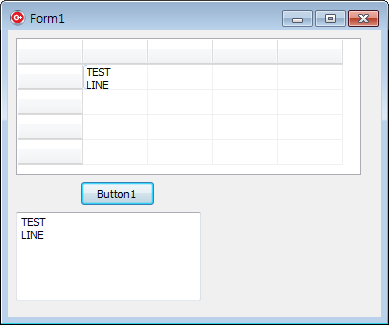
StringGrid의 Cells에 출력하고자하는 문자열을 넣으시고
DrawCell Event에서 그 값을 사용하여 출력하세요.
그리고 원래의 문자는 Cells에 들어았으니 그거 사용하시면 되구요.
아래 테스트 코드입니다.
Cells[1][1] 에 문자열 넣을 때 \r\n 사용하여 넣으면 한줄로 보이지만
DrawCell 이 호출되어 자동으로 두줄로 출력될 것입니다.
//---------------------------------------------------------------------------
void __fastcall TForm1::Button1Click(TObject *Sender)
{
    StringGrid1->Cells[1][1] = "TEST\r\nLINE";
    Memo1->Lines->Add(StringGrid1->Cells[1][1]);
}
//---------------------------------------------------------------------------
void __fastcall TForm1::StringGrid1DrawCell(TObject *Sender, int ACol, int ARow, TRect &Rect,
          TGridDrawState State)
{
    if(ACol > 0 && ARow > 0) {
        StringGrid1->Canvas->Brush->Color = clWhite;
        StringGrid1->Canvas->FillRect(Rect);
        DrawText( StringGrid1->Canvas->Handle, StringGrid1->Cells[ACol][ARow].c_str(),-1,&Rect, dtaLeft);
    }
}
//---------------------------------------------------------------------------
StringGrid 님이 쓰신 글 :
: 안녕하세요.
:
: StringGrid내에서 한 Cell에 Text를 두줄로 넣고자
:
: DrawText( StringGrid1->Canvas->Handle,ansi.c_str(),-1,&TextRect,dtaLeft);
: DrawText 메소드를 사용했습니다.
:
: 그런데 2줄로 DrawText한 Text를 다시 반환받고싶습니다.
:
: 2줄값으로요.. 어떻게하면될까요?
:
:
: StringGrid->Cell[ACol][ARow] = Text + "/n" + Text; 같은경우는 Text반환은 되지만
:
: 2줄로 표현이 되지않습니다.
:
:
: StringGrid에서의 2줄 텍스트로 입력된 텍스트들을
:
: 엑셀에 2줄 텍스트를 그대로 저장하고자합니다.
:
: 혹시 방법이 있다면 알려주세요! 감사합니다!!!
|