|
나도 초보인데... 심심해서 방황하다... 볼랜드 그리고 QnA 그래서 맨 앞에 것
휴 다행이 아는 것이다... 그래서 답변드림... 이런 자료 있을 것인데...
중복 아닌가 모르겠다...
image.rc
image.rh 그냥 늘 이렇게 습관적으로 사용하고 있습니다.
그냥 보시면 알겠지요... 참 쉽지요... ㅋㅋㅋㅋ ==> 아래 소스, 폴더, Ctrl+Alt+F11 로 파일 들어간 것 보면 이해될 것임...
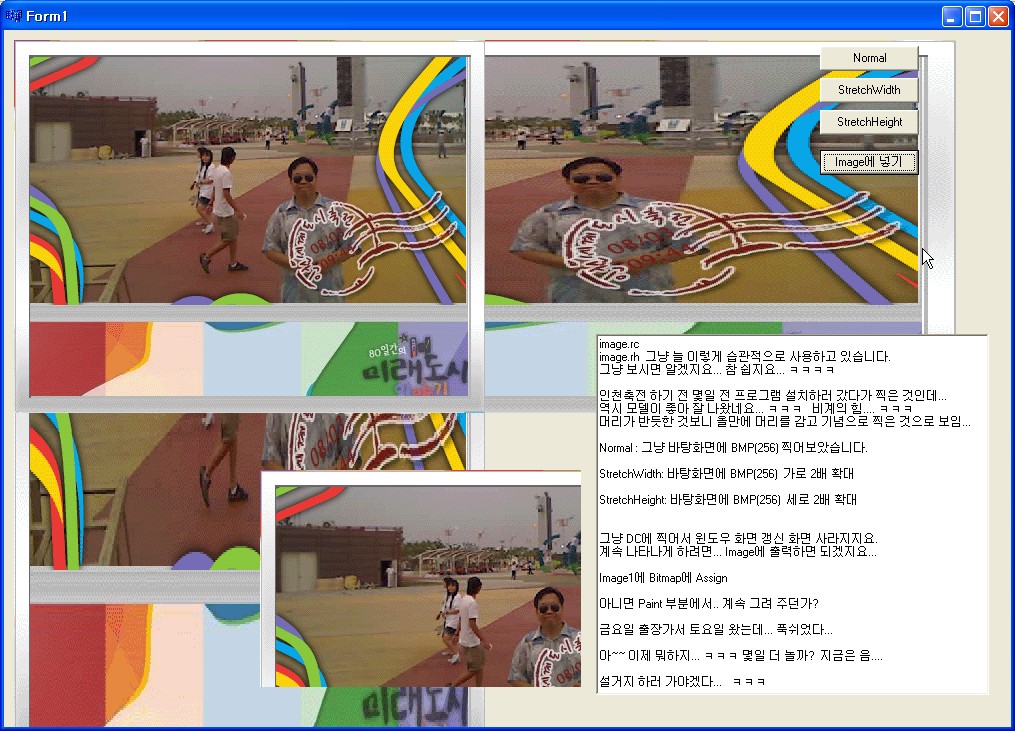
인천축전 하기 전 몇일 전 프로그램 설치하러 갔다가 찍은 것인데...
역시 모델이 좋아 잘 나왔네요... ㅋㅋㅋ 비계의 힘.... ㅋㅋㅋ
머리가 반듯한 것보니 올만에 머리를 감고 기념으로 찍은 것으로 보임...
Normal : 그냥 바탕화면에 BMP(256) 찍어보았습니다.
StretchWidth: 바탕화면에 BMP(256) 가로 2배 확대
StretchHeight: 바탕화면에 BMP(256) 세로 2배 확대
그냥 DC에 찍어서 윈도우 화면 갱신 화면 사라지지요.
계속 나타나게 하려면... Image에 출력하면 되겠지요...
Image1에 Bitmap에 Assign
아니면 Paint 부분에서.. 계속 그려 주던가?
금요일 출장가서 토요일 왔는데... 푹쉬었다...
아~~ 이제 뭐하지... ㅋㅋㅋ 몇일 더 놀까? 지금은 음....
설거지 하러 가야겠다... ㅋㅋㅋ... 행복하세요......
//---------------------------------------------------------------------------
#include <vcl.h>
#pragma hdrstop
#include "Unit1.h"
//---------------------------------------------------------------------------
#include "image.rh"
#pragma package(smart_init)
#pragma resource "*.dfm"
TForm1 *Form1;
//---------------------------------------------------------------------------
__fastcall TForm1::TForm1(TComponent* Owner)
: TForm(Owner)
{
}
//---------------------------------------------------------------------------
void __fastcall PaintBitbltWidth( HDC dcGround, Graphics::TBitmap *bmp, int sx, int sy ) //, int ex, int ey ) //ex 0, ey 0이면
{
HDC dc = bmp->Canvas->Handle;
::BitBlt( dcGround, sx, sy, bmp->Width, bmp->Height, dc, 0, 0, SRCCOPY ); //iWidth-(iGaugeRealWidth+FiBevelWidth)
}
void __fastcall PaintStretchWidth( HDC dcGround, Graphics::TBitmap *bmp, int sx, int sy, int width )
{
HDC dc = bmp->Canvas->Handle;
::StretchBlt( dcGround, sx, sy, width, bmp->Height, dc, 0, 0, bmp->Width, bmp->Height, SRCCOPY ); // handle of destination device context
}
void __fastcall PaintStretchHeight( HDC dcGround, Graphics::TBitmap *bmp, int sx, int sy, int height )
{
HDC dc = bmp->Canvas->Handle;
::StretchBlt( dcGround, sx, sy, bmp->Width, height, dc, 0, 0, bmp->Width, bmp->Height, SRCCOPY ); // handle of destination device context
}
void __fastcall TForm1::Button1Click(TObject *Sender)
{
Graphics::TBitmap *bmp = new Graphics::TBitmap();;
bmp->LoadFromResourceID( (int)HInstance, BMP_PIC_M1000 );
PaintBitbltWidth( this->Canvas->Handle, bmp, 10, 10 );
delete bmp;
}
//---------------------------------------------------------------------------
void __fastcall TForm1::Button2Click(TObject *Sender)
{
Graphics::TBitmap *bmp = new Graphics::TBitmap();;
bmp->LoadFromResourceID( (int)HInstance, BMP_PIC_M1000 );
PaintStretchWidth( this->Canvas->Handle, bmp, 10, 10, bmp->Width*2 );
delete bmp;
}
//---------------------------------------------------------------------------
void __fastcall TForm1::Button3Click(TObject *Sender)
{
Graphics::TBitmap *bmp = new Graphics::TBitmap();;
bmp->LoadFromResourceID( (int)HInstance, BMP_PIC_M1000 );
PaintStretchHeight( this->Canvas->Handle, bmp, 10, 10, bmp->Height*2 );
delete bmp;
}
//---------------------------------------------------------------------------
void __fastcall TForm1::Button4Click(TObject *Sender)
{
Graphics::TBitmap *bmp = new Graphics::TBitmap();;
bmp->LoadFromResourceID( (int)HInstance, BMP_PIC_M1000 );
Image1->Picture->Bitmap->Assign( bmp );
delete bmp;
}
//---------------------------------------------------------------------------
|